
Why Is My Mini Split Blowing Cold Air in Heat Mode? 7 Causes & Fixes
You switch your mini split to Heat mode, expecting warm air, but instead, the room still feels chilly. Is something wrong with your system?
Not necessarily!
If your mini split seems to be blowing cold air while heating, the cause could be something as simple as a normal defrost cycle, an incorrect remote setting, or a dirty air filter.
The good news? Several common causes are easy to check before calling for service.
In this guide, we'll walk through seven reasons your mini split might not be heating as expected, what you can safely check, and when it's time to contact an HVAC professional.
Quick Answer: Why Is My Mini Split Blowing Cold Air in Heat Mode?
A mini split that seems to blow cold air in Heat mode may be going through a normal defrost cycle, warming up before heating, or operating with an incorrect setting.
Start by checking that your remote is set to Heat mode (the sun symbol), your temperature setting is above the current room temperature, and your filters are clean.
If the system continues blowing cool air or isn't warming your space after normal startup and defrost periods, check for blocked airflow around the outdoor unit and contact a qualified HVAC professional if the problem persists.
What You'll Learn
- Seven common reasons your mini split may not be heating properly
- How to recognize a normal defrost cycle
- Which remote settings to check first
- How dirty filters can affect heating performance
- What to do when snow or ice builds up around your outdoor unit
- How outdoor temperatures affect mini split heating
- When professional HVAC service may be needed
1. Seven Reasons Your Mini Split May Be Blowing Cold Air
Before assuming your mini split needs repairs, start with these common causes.
| Possible Cause | What You Might Notice | What to Do |
|---|---|---|
| 1. Defrost cycle | The indoor fan pauses, and you may notice steam near the outdoor unit. | Allow the system to complete its normal defrost cycle. |
| 2. Indoor coil warm-up | Airflow pauses shortly after switching to Heat mode. | Give the system a few minutes to warm up. |
| 3. Incorrect operating mode | The remote displays Auto, Cool, Dry, or Fan instead of Heat. | Select Heat mode using the sun symbol. |
| 4. Temperature setting | The room is already near or above the selected temperature. | Set the temperature slightly above the current room temperature. |
| 5. Dirty air filters | Airflow feels weaker than usual. | Inspect and clean the filters according to your manual. |
| 6. Blocked outdoor unit | Snow, leaves, or ice restrict airflow around the unit. | Clear loose debris and snow while following required clearances. |
| 7. Heating capacity or system issue | The unit struggles to maintain comfort or consistently produces insufficient heat. | Review your model's heating specifications and arrange service if needed. |
Some of these situations are part of normal heat pump operation, while others may indicate that your system needs maintenance or professional attention.
Let's take a closer look.
2. Is Your Mini Split in Defrost Mode?
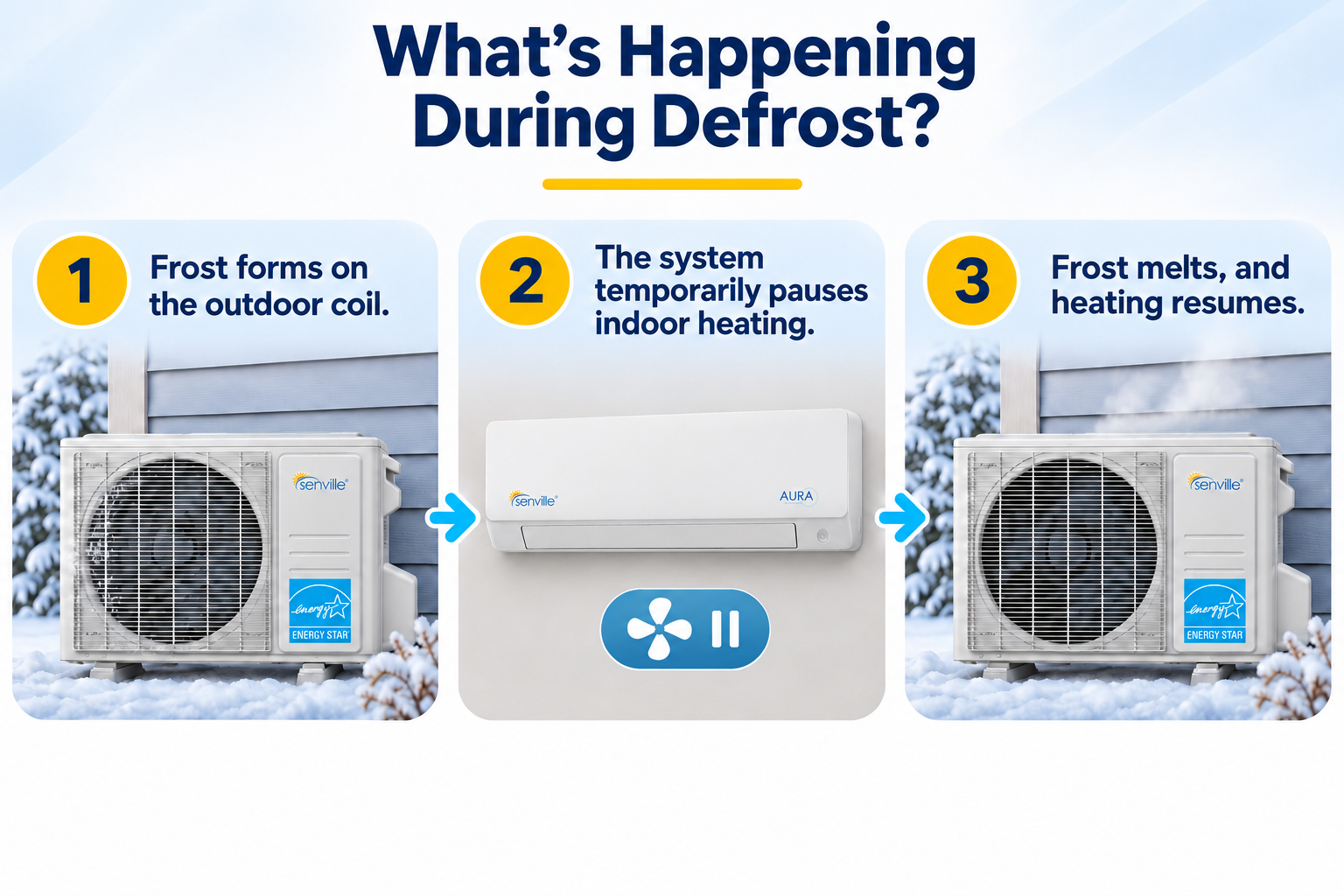
If your mini split temporarily stops delivering warm air during cold weather, it may simply be performing a defrost cycle.
When a heat pump operates in heating mode, its outdoor coil can develop frost as it extracts heat from the surrounding air.
To maintain performance, the system periodically enters defrost mode to remove frost from the outdoor coil.
What Happens During Defrost?
You might notice:
- The indoor fan slows down or temporarily stops.
- The outdoor fan pauses.
- Steam or mist appears around the outdoor unit.
- Heating resumes after the cycle finishes.
These are generally normal signs of defrost operation.
How Long Does Defrost Mode Last?
Many heat pumps complete a defrost cycle within several minutes, although the duration and frequency vary depending on the model and outdoor conditions.
During this time, avoid repeatedly switching the system on and off. Allow it to complete the cycle normally.
Good to Know: Defrost cycles may occur more frequently during damp, chilly weather when frost can form on the outdoor coil. A temporary pause in heating doesn't necessarily mean your mini split is malfunctioning.
If your system remains in defrost mode unusually long or repeatedly fails to resume heating, consult your model's manual or contact Senville support.
3. Why Does My Mini Split Blow Cool Air When I First Turn On Heat?
Have you ever switched your mini split to Heat mode and noticed that the indoor fan doesn't start immediately?
That's often intentional.
Many mini split heat pumps include an anti-cold-air function that temporarily delays indoor airflow while the system prepares to deliver heat.
This helps prevent the unit from blowing unheated air into your room immediately after startup.
What Should You Do?
- Confirm that Heat mode is selected on your remote.
- Set your desired room temperature.
- Allow the system several minutes to begin heating.
- Check whether warm airflow resumes.
Avoid repeatedly changing modes or increasing the temperature setting while the system starts up.
If your mini split doesn't begin heating after a reasonable startup period, continue with the checks below.
Need help changing modes? Read our guide to switching your mini split from cooling to heating.
4. Check Your Mini Split's Mode and Temperature Settings
Sometimes, the issue isn't the heat pump itself. It's the settings on the remote.
A mini split can operate in several different modes, including cooling, heating, fan, dry, and automatic operation.
If the wrong mode is selected, the unit may not provide the heating you're expecting.
Step 1: Select Heat Mode
Point your Senville remote toward the indoor unit.
Press the MODE button until the sun symbol appears.
The sun symbol indicates Heat mode.
For consistent heating during colder weather, selecting Heat mode directly can be more predictable than leaving the system in Auto mode.
Step 2: Check Your Temperature Setting
Make sure your selected temperature is higher than the current room temperature.
For example, if your room is 68°F, try setting the system to 70°F or 71°F.
This helps confirm that the unit is receiving a call for heat.
Remember: Setting your mini split to an unusually high temperature won't necessarily make it heat the room faster.
Step 3: Review the Fan Setting
If your model supports it, consider using the Auto fan setting.
This allows the system to adjust airflow according to its operating conditions.
Step 4: Give the System Time
After selecting Heat mode, allow the system to begin heating and stabilize before evaluating its performance.
If the air remains cool and the room temperature isn't increasing, move on to the next troubleshooting steps.
Heat Mode vs. Auto Mode: What's the Difference?
In Heat mode, your mini split operates to maintain your selected heating temperature.
In Auto mode, compatible systems may automatically choose between heating and cooling depending on the room conditions and selected temperature.
For winter heating, Heat mode is generally the better choice when you want to avoid automatic switching between operating modes.
If your remote is missing or no longer working, explore Senville replacement remote controls and confirm compatibility with your model.
5. Could Dirty Air Filters Be Affecting Your Heating?
Yes! Dirty air filters can restrict airflow and reduce your mini split's ability to heat your space effectively.
Over time, dust and other airborne particles collect on the filters inside your indoor unit.
When the filters become clogged, airflow can weaken, and the system may struggle to distribute warm air throughout the room.
Signs Your Filters May Need Cleaning
- Airflow feels weaker than usual.
- Dust is visible on the filters.
- The room takes longer to reach a comfortable temperature.
- Heating performance seems reduced.
How to Clean Your Mini Split Filters
For many wall-mounted Senville mini splits, routine filter cleaning involves:
- Turn off the indoor unit.
- Carefully lift the front panel.
- Remove the washable air filters according to your model's instructions.
- Clean the filters using the method specified in your owner's manual.
- Allow them to dry completely before reinstalling.
- Replace the filters and close the panel securely.
Avoid using harsh cleaning products or reinstalling wet filters.
Senville Tip: Check your filters regularly during heating season, especially if your mini split runs frequently or your home has pets. Always follow the cleaning intervals and instructions provided for your specific model.
If cleaning the filters doesn't improve airflow or heating performance, additional troubleshooting may be necessary.
6. What If Your Outdoor Unit Is Covered in Snow or Ice?
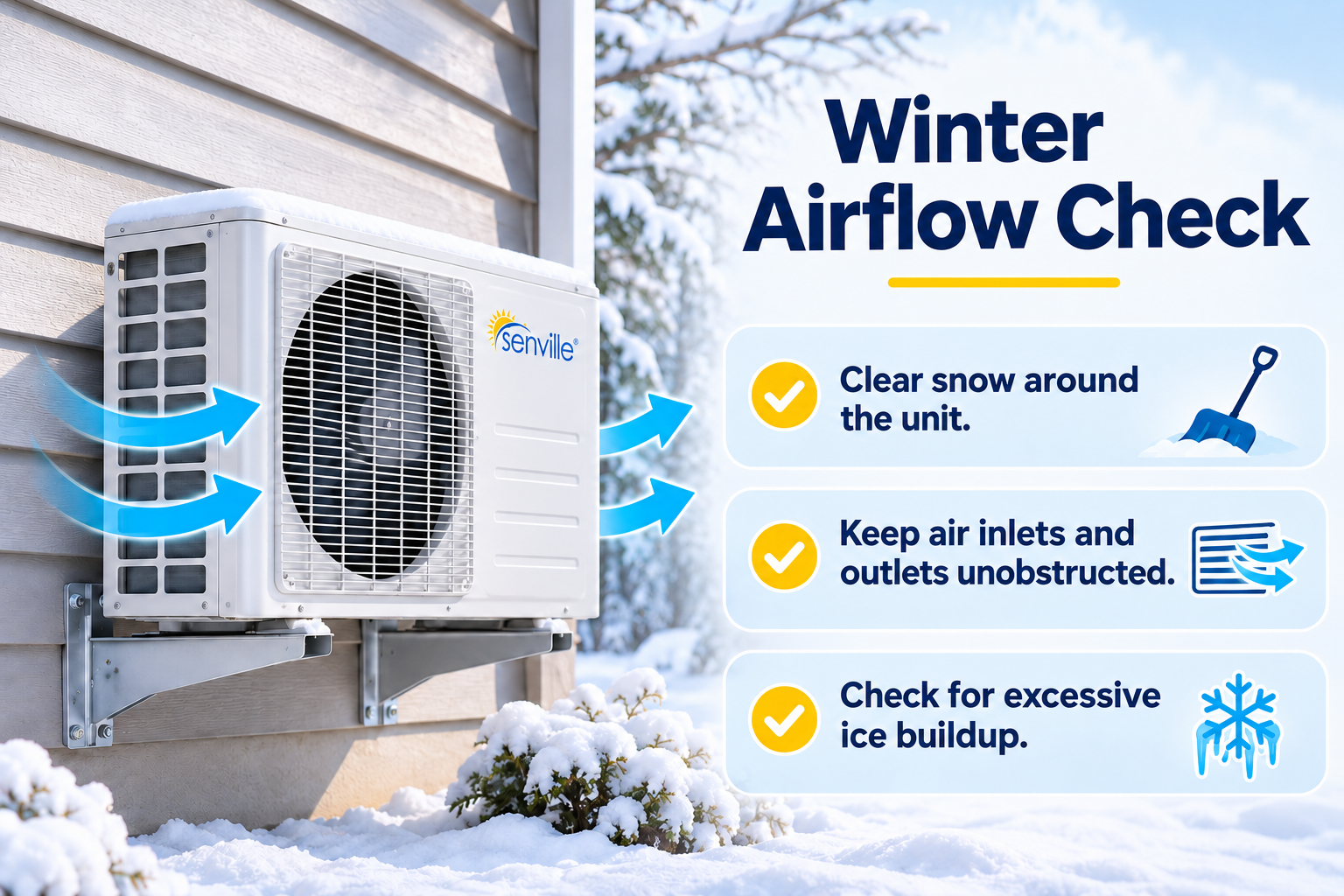
Your mini split's outdoor unit plays an essential role in heating your home.
Even during winter, a heat pump extracts heat from outdoor air and transfers it indoors.
But if snow, ice, or debris restricts airflow around the outdoor unit, heating performance may be affected.
What's Normal?
A light layer of frost may develop on the outdoor coil during heating operation.
The system's defrost function is designed to remove this frost when needed.
What's Not Normal?
Watch for conditions such as:
- Heavy snow blocking the unit's air inlet or outlet
- Large amounts of ice that don't clear during normal defrost operation
- Debris obstructing airflow
- Ice accumulation interfering with the fan or other components
How to Help Keep Your Outdoor Unit Clear
Check the area around your outdoor unit regularly during winter.
Remove loose snow, leaves, and other debris from the surrounding area while maintaining the clearances specified in your installation manual.
Avoid placing objects directly in front of the unit's airflow openings.
Important: Never chip, scrape, or forcefully remove ice from the outdoor coil or fins. Doing so can damage the equipment.
If your outdoor unit becomes heavily encased in ice or the fan appears obstructed, stop operating the system and contact a qualified HVAC technician.
Consider Outdoor Unit Placement
In snowy climates, proper installation height can help reduce the risk of snow accumulation around the outdoor unit.
Depending on your installation requirements, a suitable wall bracket or equipment stand may help keep the system elevated above expected snow levels.
Explore Senville mounting brackets and consult a qualified installer about the appropriate setup for your location.
7. Is It Too Cold Outside for Your Mini Split?
Not all mini split heat pumps are designed for the same outdoor temperatures.
As temperatures drop, a heat pump's available heating capacity and efficiency can change.
That's why it's important to understand the heating specifications of your particular system, especially if you live somewhere with long or particularly cold winters.
Senville LETO vs. AURA: Cold-Weather Heating
Senville offers different mini split series designed for different comfort needs.
| Series | Heating Focus | What to Know |
|---|---|---|
| LETO Series | Everyday heating and cooling | Select models provide heating operation down to approximately 5°F (-15°C). |
| AURA Series | Cold-climate heating and cooling | Select models are rated for heating operation down to -22°F (-30°C). |
The Senville LETO 12,000 BTU mini split is one option for spaces where its heating specifications meet the project's requirements.
For colder climates, the Senville AURA 12,000 BTU mini split offers cold-weather heating capabilities.
Important: A minimum operating temperature does not mean a heat pump delivers its full rated heating capacity at that temperature. Actual heating performance depends on outdoor conditions, equipment sizing, installation, and the exact model.
What If Your Mini Split Struggles During Extreme Cold?
If your mini split operates but cannot maintain your desired indoor temperature during very cold weather, several factors could be involved.
These include the system's available heating capacity at that outdoor temperature, your home's heat loss, or an equipment issue.
A properly sized system should be selected based on the heating requirements of the space and the local climate.
If you're unsure whether your mini split is appropriately sized, consult a qualified HVAC professional.
You can also explore Senville's mini splits by room size as a starting point.
For more information, read our guide to cold-climate heat pumps.
8. When Should You Call an HVAC Technician?
While many mini split heating concerns can be explained by normal operation or simple maintenance needs, some symptoms require professional attention.
Contact a licensed HVAC technician if:
- Your mini split continues delivering cool air and cannot warm the room after normal startup and defrost periods.
- Heavy ice repeatedly builds up on the outdoor unit.
- You notice unusual frost or ice on refrigerant lines.
- An error code appears and continues returning.
- The system produces unusual grinding or other concerning mechanical noises.
- Airflow remains weak after cleaning the filters.
- Heating performance has noticeably declined without an obvious explanation.
These symptoms may indicate an issue involving refrigerant, sensors, electrical components, or other parts of the system.
Refrigerant-related repairs and internal electrical servicing should always be handled by a qualified professional.
Need additional help? Visit the Senville Support Center for product manuals, troubleshooting information, and support resources.
9. Frequently Asked Questions
How long does a mini split defrost cycle last?
Defrost cycles commonly last several minutes, although the exact duration varies by model and outdoor conditions. Heating should resume automatically once the cycle finishes.
Is it normal for a heat pump to blow cold air for a few minutes?
A brief pause in warm airflow can be normal when heating first starts or during a defrost cycle. Many systems temporarily reduce or stop indoor fan operation to help prevent cold drafts.
Why is my mini split blowing cold air in Auto mode?
Auto mode may allow a compatible mini split to switch between heating and cooling based on room conditions. For consistent winter heating, select Heat mode using the sun symbol on your remote.
Can a dirty filter make a mini split blow cold air?
Dirty filters can restrict airflow and reduce heating performance. Inspect and clean your filters according to your Senville owner's manual.
At what temperature does a Senville mini split stop heating?
It depends on the model. Select LETO systems are rated for heating down to approximately 5°F, while select AURA cold-climate systems can operate in heating mode down to -22°F. Always verify the specifications of your exact system.
Should I turn off my mini split when it's defrosting?
Generally, no. Defrosting is a normal part of heat pump operation. Allow the system to complete the cycle unless your manual indicates otherwise or you notice an unsafe condition.
Why is my mini split running but not heating my room?
Possible causes include incorrect settings, dirty filters, restricted outdoor airflow, insufficient heating capacity for current conditions, or an equipment issue. Start with the basic checks and arrange professional service if the problem continues.
10. Keep Your Home Comfortable Through Heating Season
If your mini split seems to be blowing cold air in Heat mode, it doesn't always mean something is wrong.
A brief defrost cycle, indoor coil warm-up, or incorrect setting may explain the change in airflow.
Start with the simple checks: confirm Heat mode, review your temperature setting, inspect your filters, and make sure the outdoor unit has adequate airflow.
If your system continues struggling to heat your space, consult your owner's manual or contact a qualified HVAC professional.
And if you're considering a mini split for a colder climate, choosing a system with heating performance suited to your local winter conditions is an important place to start.
Explore Senville's Cold-Climate Heating Options
Senville's AURA Series offers heating and cooling solutions designed for colder climates, with select models rated for heating operation down to -22°F.
Explore the Senville AURA SeriesSenville Products & Resources Mentioned
- AURA 12,000 BTU Mini Split Heat Pump — Cold-climate heating and cooling.
- AURA 18,000 BTU Mini Split Heat Pump — An option for larger spaces, subject to proper sizing.
- LETO 12,000 BTU Mini Split Heat Pump — Heating and cooling for compatible applications.
- Senville Mounting Brackets — Outdoor unit mounting accessories.
- Senville Remote Controls — Replacement remote control options.
- Senville Support Center — Product manuals and troubleshooting resources.
Disclaimer: This article is provided for general informational purposes only and is not a substitute for professional HVAC, electrical, or safety advice. Heating performance, operating conditions, and maintenance requirements vary by model. Always consult your Senville owner's manual and a qualified HVAC professional before performing repairs or servicing your equipment.